
Search
Purpose | This document describes how to use the search feature in Forrit CMS |
Prerequisites | Content must have been created in order for the search feature to work. |
Supplementary |
Introduction
The search feature will look through the entire system for any item matching a given word. It will find any editable item in the system with that name or content, or that has a matching tag. All tasks will be searched, including the current one.
Instructions
To search for an item:
Click the Search icon located on the right of the top bar:

A search field will expand next to the icon:

Type in a word to search for.
As you type, the dropdown menu will update with found items. The dropdown menu divides items into three sections:
items modified in the current task,
items modified in other tasks,
items in approved content.
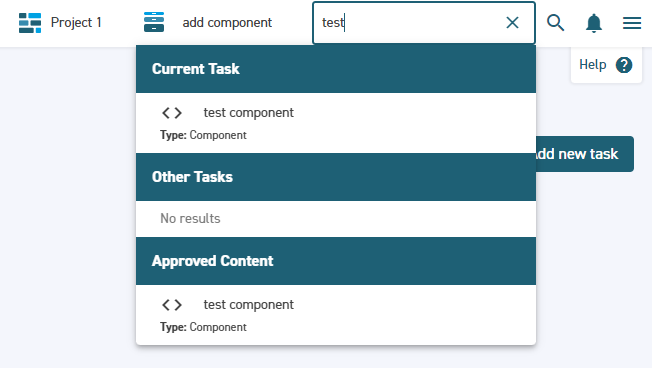
Select an item from the dropdown to open it. If the item lies within another task the CMS will automatically switch to that task.
The following items can be found using a search:
ComponentsContent ItemsData Feed DefinitionsData Feed ItemsMedia ItemsPagesRolesVariantsWorkflowsPicklists