
Variants should not be used for localisation – for this purpose, instead see Locales.
Introduction
Variants are different versions, or variations, of the same Page. They can be used to tailor Pages to specific audiences – for example, to different U.S. states. As a developer, you add Variants to Projects and content editors configure them in the Page Editor.
In this section, you will learn:
-
What a Variant is
-
How Variants can be used
-
How you add Variants
-
How Variants modify content
Variant overview
Variants are different versions, or variations, of the same Page
A Variant is a version of a Page with distinct content – it is configured per component by the Content editor in the Page editor. You add Variants to Projects, and then Content editors decide which Components and Content entries to show to the audience they’re targeting per that Variant.
For instance, a Variant might cater to a particular demographic segment, embrace a festive Christmas theme, or incorporate new features for A/B testing. Additionally, Variants can be used to customise content for specific geographic regions within a common locale, like U.S. states.
Variants aren’t created on a Page-by-Page basis. You define them once for a Project. They then exist as blank, separate versions of every Page. For example, if you add a ‘summer’ Variant, content editors can then see and customise it for any Pages, allowing them to create a summer-themed versions.
Variants customise content, not layout
Content editors can only use Variants to customise the content of a Page, not its layout.
This is because Variants share the Page Layout and simply provide an alternate set of Content Entries. Therefore, any changes to a Page Layout are reflected in all Variants of the Page.
Variants may hide specific Components
Content editors can configure Variants to hide specific Components from a Page.
This means they can show a particular Component in one Variant and not in others.
Content is always associated with a Variant (and a Locale)
Every Content Entry that you create is associated with a Variant via Component configuration in the Page Editor– even None is technically a Variant.
Content Entries are always associated with a particular Locale. This means the content of a Page is invariably tied to a Variant-Locale combination, which must be selected to preview a Page, the default being None-Default locale.
Each Variant-Locale combination has a distinct set of Content Entries that you can fill out.
Variants provide a set of Content Items for a Page
Variants produce separate versions of Pages by providing them with different sets of Content Entries.
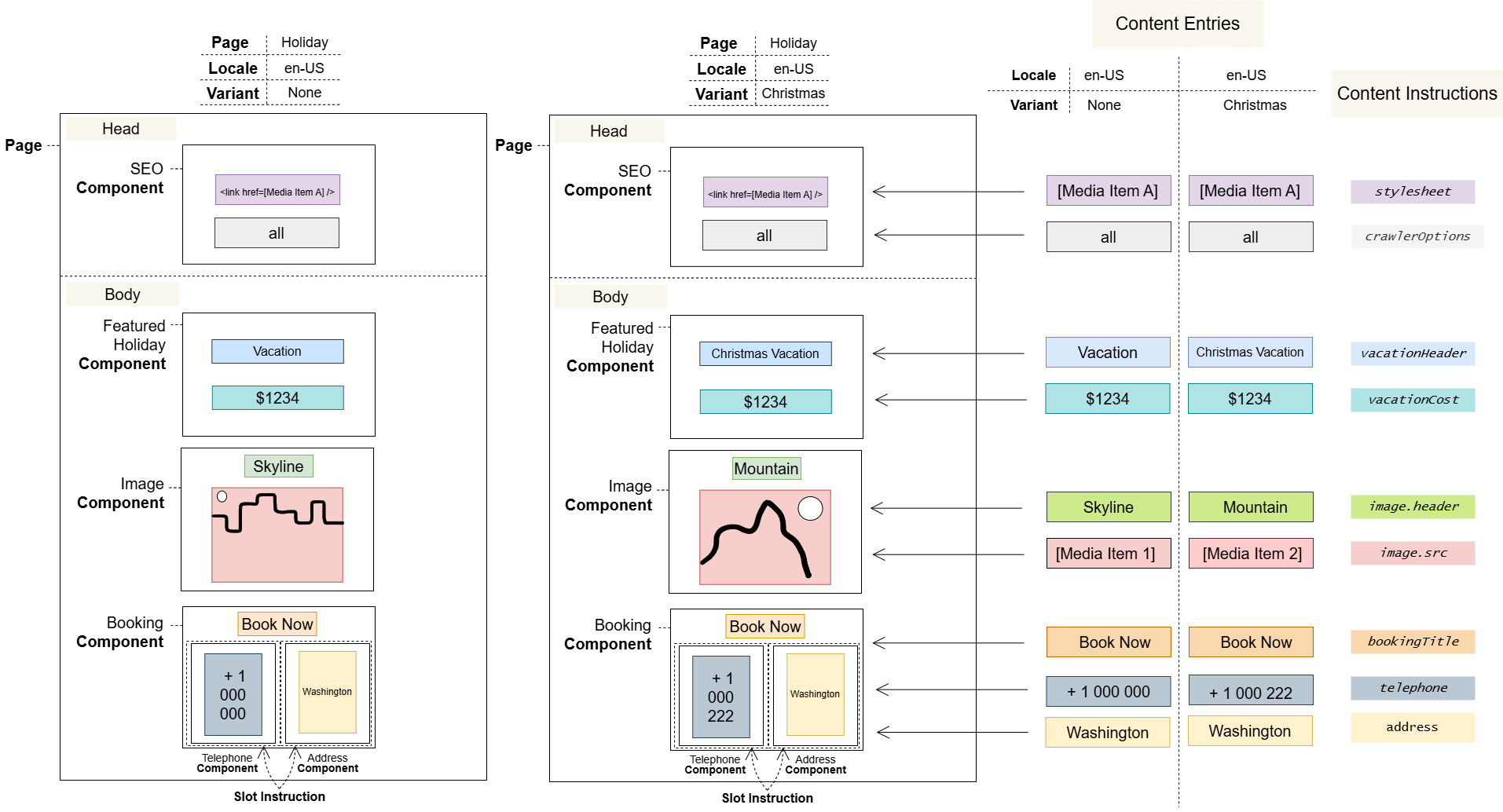
The following diagram includes two Page Variants, and shows:
-
Even
Noneis technically a Variant. -
Each Variant provides a set of Content Entries.
-
Content Items are always associated with both a Variant and a Locale.
-
The Variables you define create placeholders for Content Entries in every Variant-Locale combination.
Notes
Variants are Task-protected.
Variants are immediately available in Consumer Applications once released, even if they haven’t yet been configured and all their Content Items are empty.
As a developer, you implement the business logic in Consumer Applications, using the SDK, that determines which Variant is returned for each Page request.
User journeys
Glossary
See the Glossary for more information.