
Pages are created by content editors
Introduction
Pages are larger units of content made up of Components. They’re assembled by content editors from the Components you create. Pages often contain the content of a ‘page’ or ‘screen’ in an application, but they can be used for any content.
In this section, you will learn:
-
What a Page is
-
How Components fit into Pages
-
How Component Content Instructions relate to Content Entry Fields
Page overview
A Page is a larger unit of content made up of Components
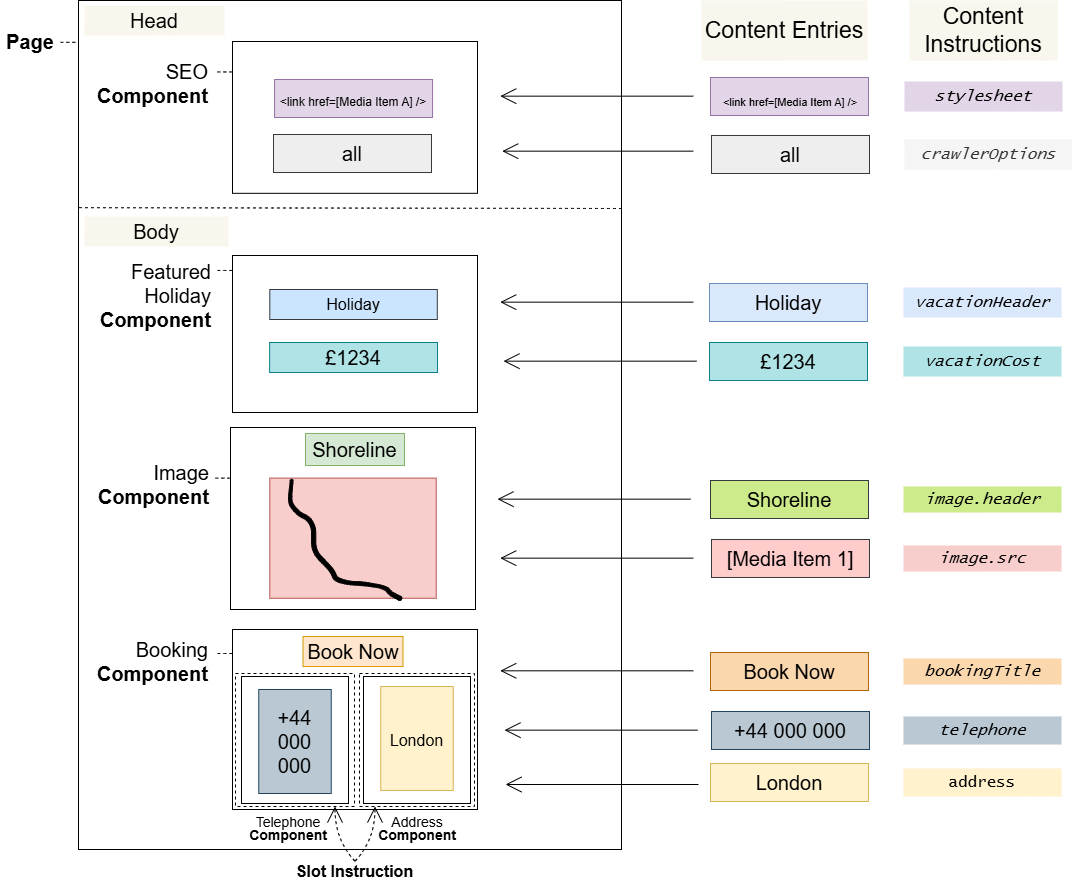
Pages consist of one or more Components. Content editors build them by arranging the Components you create into a Page Layout. The Page Layout has a Head and Body section for Web (HTML) Pages and a single Document section for Headless (JSON) Pages . Components can only be inserted into the section and Page type that corresponds with their Component Type and Channel Type.
Pages also contain Content Entries, which are the values that content editors can insert where you define Content Instruction in Components. The values that can be used in a Content Entry Field depend on the Content Instruction type chosen, which is based on Field Types that you configure in Content Types.
Locales and Variants can be used to change the Content Entries on a Page. This allows content editors to tailor Pages to different locales and audiences.
Pages, Components and Content Entries
The following diagram shows how Pages are composed of Components, with values from Content Entries inserted where Content Instructions have been defined.
Notes
Content Entries and Slot Instruction Components are filled out by content editors using the Page Editor.
Pages have a route associated with them, which denotes the path they should be available from in Consumer Applications.
Glossary
See the Glossary for more information.