
Components are created by developers
Introduction
Components are the building blocks of Pages. You assemble them into Pages in the Page Editor. They are reusable chunks of content – for example, hero banners, headers, and buttons. You can customise Components for different contexts.
In this section, you will learn:
-
What a Component is
-
How you use Components
-
How you can customise Components with Content Entries
-
How Component types determine where they can be used
-
How Component channel determine the type of Page they can be used
-
What Component Content instructions are
Component overview
Components are the building blocks of Pages
Components are the reusable blocks you use to build Pages. They typically represent a singular piece of content – for example, a heading, button, or modal. You use them to quickly assemble and modify Pages.
You arrange Components into Page Layouts in the Page Editor. They can be reused on the same Page or across multiple. For example, you might reuse a button several times on the same Page, while a header could be reused on every Page.
Once Components are added to a Page, you can fill out Content Entries. These are editable values that allow Components to be customised for different contexts. Content Entries exist where developers define placeholders known as Content Instructions.
Components have a type – either Heador Body. This determines which sections of the Page Layout you can use them in.
Pages, Components, and Content Entries
The following diagram shows how Components can be laid out on a Page. Values in Content Entries are inserted where Content Instructions have been defined by developers.
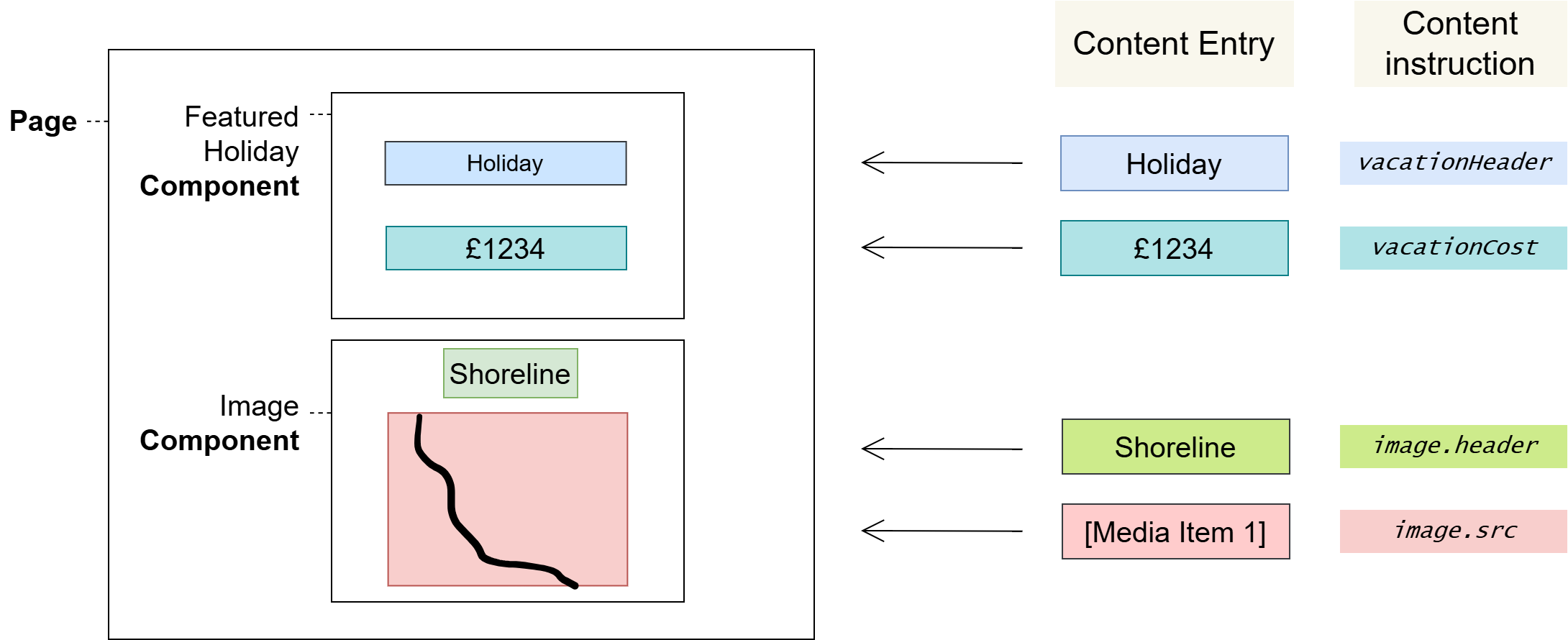
Reusing Components across Pages
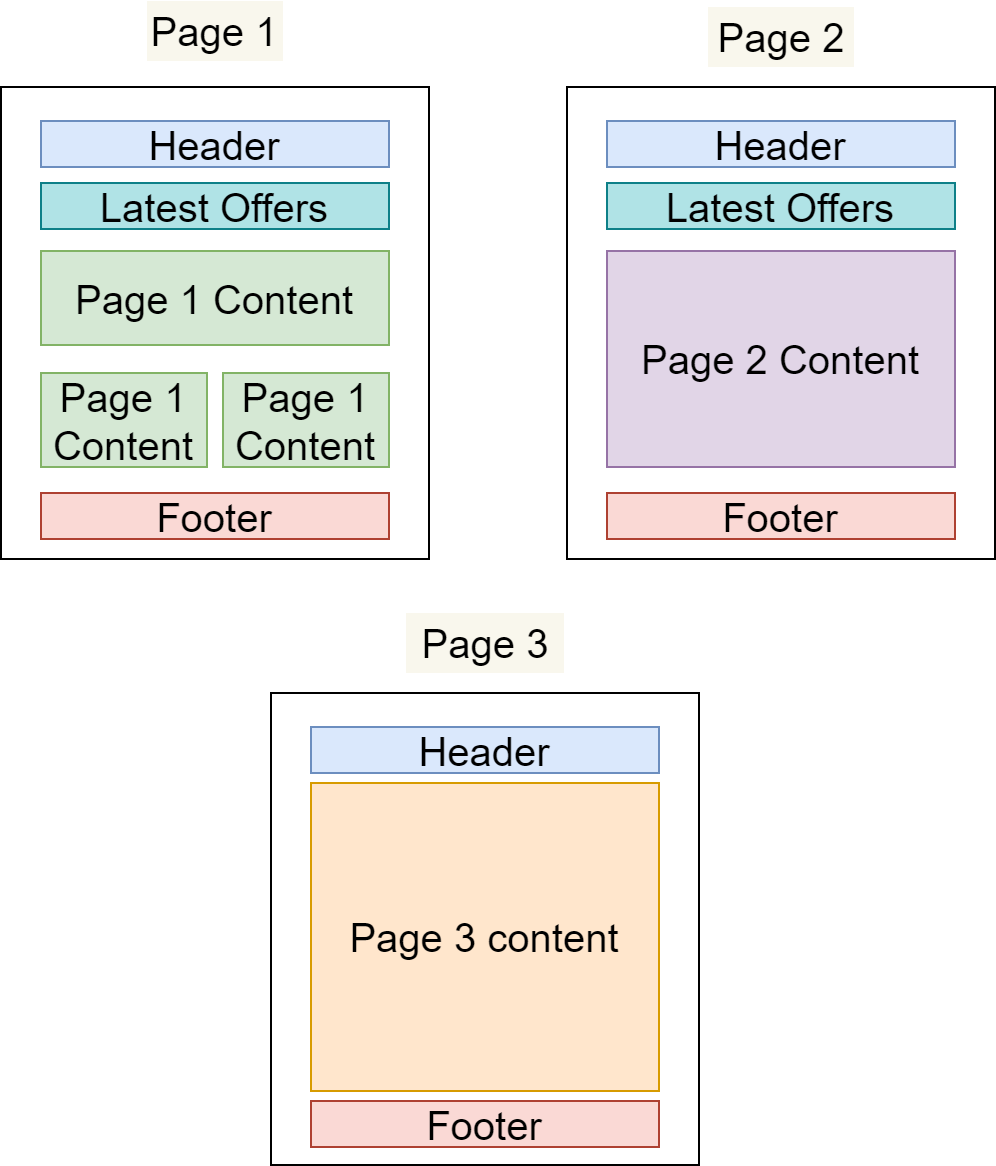
In the example below, we have defined three different Pages that share Components:
-
The "Header" and "Footer" Components are common to all Pages
-
The "Latest Offers" Component is shown on Page 1 and Page 2 only
-
All three Pages have their own primary content area that is not present on any other Page
The benefits of using Components
-
Productivity
Building from pre-existing content is much faster than starting anew.
-
Standardisation
It’s easy to standardise when reusing Components across an application: developers can make updates centrally in one place, and those changes will propagate through the application everywhere that you’ve used the Component – making common standardisations like theming easier to manage.
-
Quality & Safety
The modularity and deduplication that comes with componentisation reduces the cognitive load on content editors and developers, reducing the overall amount of content and lines of code, and allowing for more time and focus on important tasks such as quality, testing, and security.
Component Types
Developers designate Components as one of the following Component Types, which determines the Page Layout sections you can insert them into:
|
Component Type |
Applicable Page Layout Section |
|---|---|
|
Head |
Head |
|
Body |
Body |
Component Channel
Developers designate Components for one of the following Channel, which determines which Page channel type that the component can be used for.
|
Component Channel |
Page Channel Type |
|---|---|
|
HTML |
Web Pages |
|
JSON |
Headless Pages |
What is a Content Instruction?
There are four instruction types available within Components; Content, Repeater, Child, and Slot.
Instructions provide various functions such as defining where content is placed in your component, looping over collection items and linking to other components. Content, Repeater and Child Instructions will only be present when the Component has selected a Content Type. Slot instructions are only available for components created for Web (HTML) channels.
Content instruction allows you to insert content for a Content entry field onto the page based on field type e.g. Media, Picklist or Value.
Repeater instruction allows you to repeat a Content fragment for all content entries based on selected Content types linked to a reference link collection field types.
Child instruction can be used to select Components based on the selected Content types linked in a reference link field types. The Developers may offer default components for the selected Content types, which you can amend to alternative Components relating to the linked Content types.
Slot instruction can be used to select Components that are outside of the data modelling of Content types and entries. This instruction is not available for the JSON (Headless) channel.
Notes
Components may also include scripts, styles, SEO metadata and more that you can add to a Page.
Glossary
See the Glossary for more information.